PT file visualization function attributes
Other than the mandatory settings like the PT config file path and where you want to save the HTML, you can tweak several other options to adjust how the final plot looks.
Sorting
This attributes is used to activate the sorting mechanism, set to True as default to enable sorting. To disable, use:
power_train_network_viewer(pt_file_path, network_file_path, sorting=False)
Sorting reference layer
This attribute sets the reference level used by the sorting mechanism. The default approach is the from-storage approach, which helps minimise connection crossings and possibly improves the structure layout.
Caution
If there is any non-propulsor node at the top of the hierarchy, the attribute will be overwritten with from-propulsor approach to prevent crossing.
To configure the sorting process to from-propulsor approach, use:
power_train_network_viewer(pt_file_path, network_file_path, from_propulsor=True)
Note
If the crossing remains after switching between two approaches, please check the the sequencing of the node(s) that is/are causing crossing in the PT configuration file.
Plot orientation
This attribute specifies the orientation of the main powertrain architecture. The four valid options are
"TB" (Top–Bottom), "BT" (Bottom–Top), "LR" (Left–Right), and "RL" (Right–Left). To configure the
orientation, use:
power_train_network_viewer(pt_file_path, network_file_path, orientation="TB")
Legend position
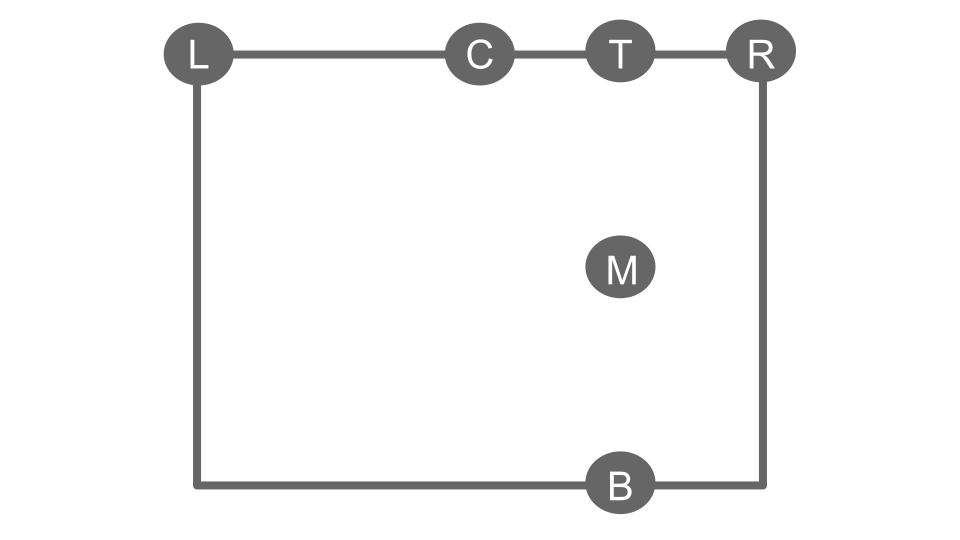
This attribute specifies the placement of the connection-color legend. Valid entries are: T (top), M (middle, vertical), B (bottom), L (left), R (right), and C (center, horizontal).
The layout is illustrated below:
To configure the position, use:
power_train_network_viewer(pt_file_path, network_file_path, legend_position="TR")
Plot size scaling
This attribute allows to resize the architecture while keeping the original aspect ratio. Only positive values are valid. To configure this factor, use:
power_train_network_viewer(pt_file_path, network_file_path, plot_scaling=1.2)
Legend size scaling
This attribute allows to resize the color legend while keeping the original aspect ratio. Only positive values are valid. To configure this factor, use:
power_train_network_viewer(pt_file_path, network_file_path, legend_scaling=1.2)
Plot animation
This attribute enables an animated powertrain architecture of showing active power transfer and a state inspection for every component at each step of the flight. This is achieved by setting the local machine as a local server. However, since the plot is no longer a static HTML file, no file will be saved even if a html file path is provided. To configure this option, use:
power_train_network_viewer(pt_file_path, network_file_path, animated_plot=True)
Refresh rate
This attribute sets the frame rate to ensure smooth animation. The default refresh rate is 60 Hz. To configure the plot refresh rate, use:
power_train_network_viewer(pt_file_path, network_file_path, animated_plot=True, refresh_rate=60)
PT watcher file path
This attribute enables monitoring of each powertrain component’s performance across flight point segments. This is achieved through a sliding bar for selecting flight points and a list displayed on the right-hand side of the Bokeh canvas.
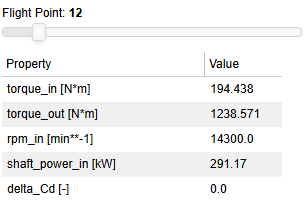
To configure the PT watcher file path, use:
power_train_network_viewer(pt_file_path, network_file_path, animated_plot=True, pt_watcher_path=pt_watcher_path)